
Gemini’s Access Changes Begin Today: What to Check
Google’s October rollout changes model availability for personal accounts, making plan details and usage limits worth a fresh look.
Google begins changing Gemini model access for personal accounts without an AI subscription today, October 9. The rollout gives everyday users a reason to check which model they can use and how their available usage is measured.
Google’s access-change notice says free accounts will have Flash-Lite. AI Plus will include Flash-Lite and Flash, while AI Pro and AI Ultra will include all three models, including Pro. AI Plus customers will receive an email with their individual effective date; October 9 is the starting date for users without a subscription.
Start with the model menu
The same notice says available models offer low, medium and high effort settings. Higher effort can produce more thorough responses while consuming more of the usage allowance. Google also recommends updating the Gemini mobile app.
The model names describe different intended uses. In its plan-management guide, Google positions Flash-Lite for quick, everyday work such as summaries and brainstorming. Flash balances speed with reasoning, while Pro is aimed at more demanding work, including complex mathematics and coding. Those are Google’s descriptions, rather than independent performance guarantees.
On the web, signed-in users can click the model name inside the text box to see their choices. That is a useful first check before repeating a familiar task or assuming a missing option is a temporary fault. Someone who mainly asks for a short outline may assess the change differently from someone who regularly works through a difficult programming problem.
Access and usage need separate checks
Google’s usage guidance describes a compute-based allowance that takes account of prompt complexity, the selected models and features, and chat length. Usage refreshes every five hours until the weekly limit is reached. Counting messages alone therefore cannot tell a reader exactly how much of an allowance remains.
The web app provides a Usage Limits entry under Settings. Google says notifications appear when an account approaches its limit, and another notification explains the refresh time when the limit is reached. These account-level indicators are a better planning tool than assuming every question consumes the same amount.
For a practical test, choose a small set of ordinary tasks: condensing a public article, organizing an outline or helping explain a concept. Compare the usefulness of the answers and note how the allowance changes. Keep the task and effort setting consistent enough to make the comparison meaningful. The aim is to understand whether the available service fits the work you actually do.
If a task is important enough to justify a subscription, write down what you need from it before comparing tiers. A specific requirement, such as handling a recurring coding task, makes that decision easier to assess.
Review the plan before changing it
Google’s management guide directs users to Settings & help, then View Subscriptions, to explore plans. Existing subscriptions can be managed through Google One. Before confirming a change, review the price and membership details shown for your account, including benefits beyond Gemini.
For anyone who depends on an AI assistant during a working day, today’s rollout is a useful moment to review that dependency. Check access before a deadline, leave room to verify the output and decide what you will do if a limit interrupts the session. A familiar app can remain part of a routine while the terms of access around it change.
Related Stories to read next from this featured panel!

Francis Halzen has won the 2026 Nobel Prize in Physics for his contributions to IceCube and its discovery of high-energy neutrinos from beyond our solar system. Announced on October 6, the award honors a vision that turned a cubic kilometer of Antarctic ice into a telescope and opened a new way to study the universe.
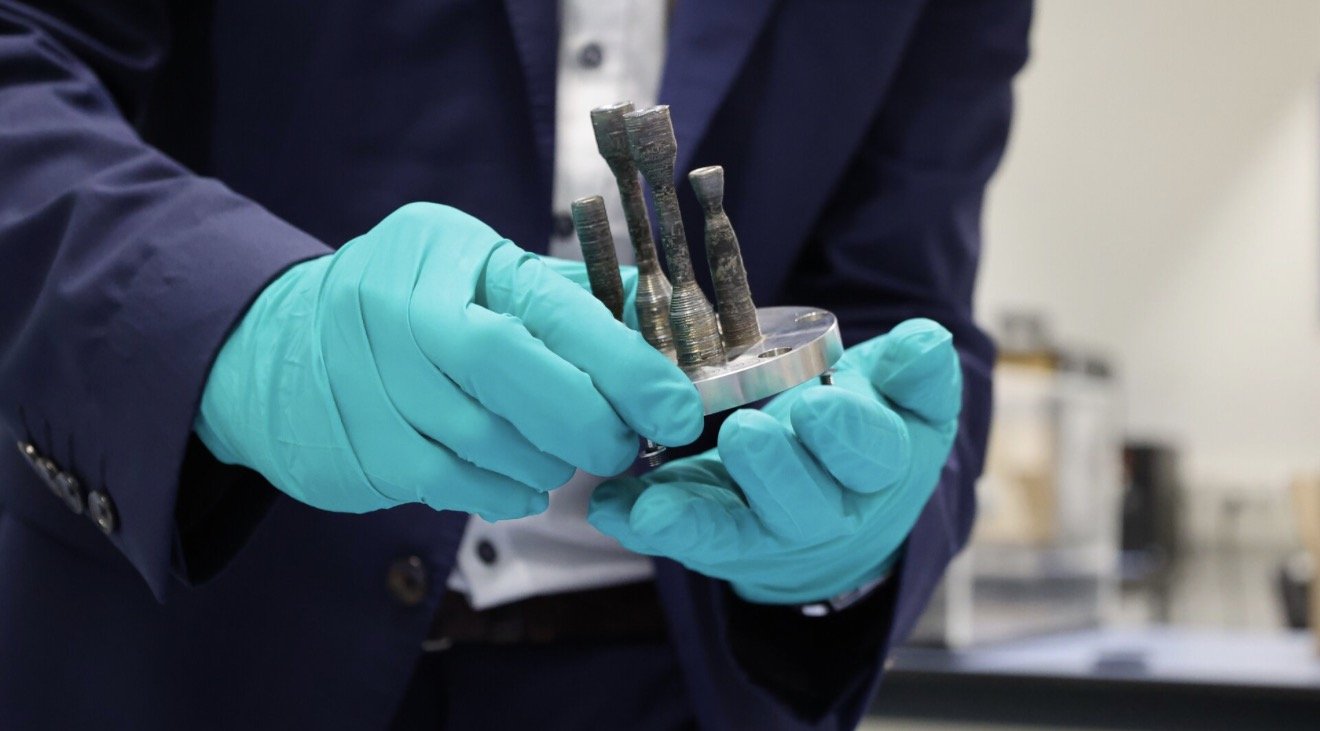
Making a metal object in orbit is a remarkable beginning. The harder question comes when that object has to do a job. ESA’s fifth metal sample printed aboard the International Space Station has returned to Earth carrying two DLR-designed experimental thrusters, the agency announced October 1. Now comes the engineering work that will determine what those small shapes can actually withstand.

This scenario is the most recent in a string of incidents in which American officials claim that drones and missiles fired by Houthi rebels in Yemen, who are aligned with Iran, have collided with destroyers in the Middle East. It also coincides with the spate of attacks against American personnel in Syria and Iraq in recent weeks due to the Israel-Hamas conflict.

It's just food for thought but what if the Apple iPhone 12 gives elemental incentive for other devices like tablets, e-readers, etc. to malfunction or crash indefinitely, hmmm makes me wonder.

The Sony A7 IV is the exceptionally foreseen replacement to the all-purpose Sony A7 III, which was delivered in 2018 yet stays a famous and competent camera.

The mechanical canine, named Spot by maker Boston Dynamics, got the attention of @bloodtear with his weird walk down a sidewalk in northern Ontario, Canada.

PlayStation Plus members will gain admittance to Sledgehammer Games' Call of Duty: WWII as a component of their membership, beginning on May 26.


When Apple at long last unveils its new iPhone 12 models in the not so distant future, we're almost certain they've going to look precisely like what you're going to find in the YouTube video loaded into this article.

Apple and Google shared a considerable lot about their COVID-19 contact detection plans with their joint declaration, however they despite everything left a few holes. Be that as it may, Apple has been happy to fill in a couple of the blank spots in a catch up with press sources.

Bag Valve Mask (BVM) ventilation is a basic crisis expertise, being proposed by New York City Government Andrew Cuomo March 28th, 2020 as a last resort should the Healthcare disaster reach an apex point.

In any case, as numbers climb, human services laborers and state pioneers have sounded the caution on clinical supplies starting to run low. In New York City, presently the focal point of the outbreak in the US, Mayor Bill de Blasio approached Trump for help and said supplies may just keep going for the following hardly any weeks.

"The health and well-being of every person who helps make these products possible is our paramount priority, and we are working in close consultation with our suppliers and public health experts as this ramp continues," the organization said.

The most recent TVs are as a rule outfitted with worked in receivers and cameras, which enable clients to convey directions to the TV or by utilizing facial acknowledgment. With these new capabilities, in that lies the peril for customers and an open door for programmers.

The Air Force is firing up generation of the air-dropped, exactness guided BLU-129 bomb progressively sought after by combat area authorities - so precise, deadly and exact, it is classified “the world’s largest sniper accuracy.”

Apple, the organization that made the present day cell phone, is depending on innovation because clients are as of now very acquainted with, similar to cameras, and assuming a lower priority with regards to cell phone advancement. Be that as it may, could the organization's commitment to well-known innovation be an advantage to the iPhone lineup?

When Facebook first declared it was getting into the crypto business—with an essentially unregulated money called Libra—the response from Wall Street and government investors was about true to form. There was doubt and pushback from the two quarters.

The U.S. national guard spending plan is one of the most enlarged on the planet, with financing surpassing $1 trillion as the Pentagon and barrier industry-accommodating lawmakers look to verify the unchallenged strength of the U.S. Military over the globe.

In front of IFA 2019 in August, Dell declared an invigorate of its XPS 13 workstation with Intel's tenth Gen Core processors — and now the Intel Core i7 model with six centers is accessible for consumers beginning at $999. With those six centers, you can probably hope to see better execution while performing various tasks, however applications should be upgraded to exploit the extra handling force.

To provide more context around Zuckerberg’s remarks, close source The Verge has gracefully published expanded transcripts from the two meetings below. In them, Zuckerberg discussed his plan to beat TikTok, why he wants to keep absolute control of the company, and what employees should tell friends who have a dim view of Facebook. Each question below was asked by a different Facebook employee.

A conceivably tenable 'super-Earth' has been found only 31 light-years from our nearby planetary group, cosmologists reported Wednesday. The planet, named GJ 357 d, is around multiple times bigger than Earth and circles a diminutive person sun GJ 357, a lot littler than our own, each 55.7 days. The global group of stargazers that found the planet said in a news discharge that it could "provide Earth-like conditions."


“Given the growing federal, state and local regulatory complexity and uncertainty regarding e-cigarettes, we plan to discontinue the sale of electronic nicotine delivery products at all Walmart and Sam’s Club U.S. locations,” says the announcement. “We will complete our exit after selling through current inventory.”

China has undoubtedly progressed toward the complete dominator as the most technologically advanced country in regards to Artificial Intelligence and it’s cutting edge systems. China’s President Xin Jingping is goaling for China to be the world’s leader in AI technology by 2030. On one end the country is putting in astronomical efforts through this AI system to boost its economy though NBC News reports that the technology was developed in the United States, “China is grappling with a slowdown that will see output growth slide to the weakest pace in almost three decades this year, as factors far beyond the trade war with the U.S. weigh on the world’s second-largest economy,” according to Bloomberg. China is also sparing no expense using their AI advancement to crack down on citizens and crack down as in below ground-level as it’s connecting to the “Concentration Camps” or “Death Camps” in which Xinjiang is known for.

Sony's First Flight crowdfunding stage has uncovered its most up to date task to help individuals beat the warmth throughout the late spring. The Reon Pocket is a compact gadget about the size of a card wallet, which fits snuggly into the back of a custom undershirt. Utilizing thermoelectric cooling, the item can be controlled by means of Bluetooth on a cell phone and either chill off or warm up, contingent upon the client's inclination.
Also check out our current Publication “The Aftermath ” Issue available now!

DOSSIER Mining releases in retrograde 'In the Land of Chromatica' with Lady Gaga's Designer Xtian de Medici, Keren Wolf, FX Pose's Naomi Cruz honoring the life of Grandfather Hector of House of Xtravaganza as our 1st cover story & Award Winning Anna Schollerova from Nora K's Whisper Naked Shadow TV mini-series and much much more!! The DOSSIER Mining compared to 'The Aftermath' issue, & others before it, is elevated reaching a better and truer essence of the Cyclolore Brand from many aspects & will so moving forward.
Google begins changing Gemini model access for personal accounts without an AI subscription today, October 9. The rollout gives everyday users a reason to check which model they can use and how their available usage is measured.